


Ribbon Cable
Why Choose Us
Our History
Company have focused on cable assembly and wire harness industry over 8 years in China. We started small business such as many small electric wires manufacturing, but now we become one of the leading ship manufactures in cable assembly industry.
Our Factory
Is located in Huizhou City Guangdong Province China, a beautiful city which has complete supply chain. We supply high quality and competitive cost cable assembly and wire harness products to customers all over the world.
Production Market
We have customers from both domestic market and oversea market. have professional sales managers can speak fluent English for good communication with oversea customers, also can provide professional technical support to customers.
Our Service
Can provide OEM/ODM on cable assembly and wire harness products, provide design, DFMEA/PFMEA support for customer, also we provide good after sell service for customers.
What is Ribbon Cable?
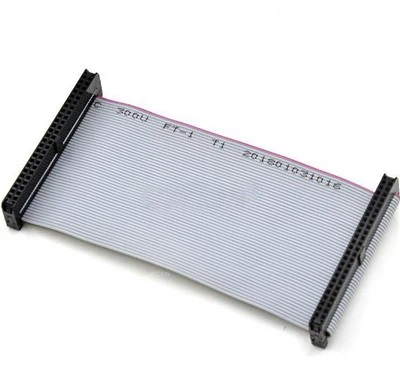
A ribbon cable is a flat, thin cable composed of multiple small-grade cables placed parallel to each other. With each core situated side by side, they form a wide-flat cable resembling a piece of ribbon, hence its name. This type of cable is mostly used in electronic systems that require multiple data buses to link internal peripherals, such as disk drives to their respective drive controllers.




Types of Ribbon Cables
Twisted Flat Ribbon Cable
The twisted ribbon cable is a variant of the standard construction but has pairs for the conductors that are twisted and bonded together. This type of twisted cable is a little bit different than twisted paired cables because parts of the cables aren't twisted. This is done to make the connectors and PCB headers able to be terminated with traditional IDC ribbon cabling techniques.
Rainbow Ribbon Cable
Rainbow ribbon cables have the same construction as the standard ribbon cable, except the rainbows' default colouring helps with organization and identification. This construction can sometimes have the ends split for individual termination.
Standard Ribbon Cable
The standard ribbon cable is used for its ability to mass terminate and can be identified by its grey colour.
Round To Flat Ribbon Cable
The round-to-flat ribbon cable is unique among ribbon constructions. The start of the cable is bundled into a circular construction and then splits apart for application use. This construction is very useful for tight space, while the ending portion still reaps the benefits that the ribbon construction offers.
What Are The Primary Uses For Ribbon Cables?
Ribbon style cables were initially created as a way to facilitate electromagnetic processing within early computer mainframes. The primary design theory with a ribbon-shaped cable is to harness a number of important wires together, and connect them into one. Wires bundled in this way are easier to install and reattach if necessary, and are overall easier to manage within machines.
Ribbon cabling is used for data transmission and communications applications. It is often the cable of choice for computer cable applications, where it is used as internal wiring for hard drives, CD drives, and connecting other parts together. Like FFC cable, Ribbon cables are also commonly used as internal wiring for other electronics and appliances. They can be found in testing and measuring equipment, automated termination equipment, robotics, and pick and place equipment as well.
Pitch
Pitch is spacing. It refers to the spacing of conductors within the ribbon cable. The pitch depends on the cable requirements and specifications. Some examples of pitches include 0.5mm, 1mm, 1.25mm, 2mm.
Ribbon cable pitch VS connector pitch
The ribbon cable pitch of the connector and that of a ribbon cable is never the same. The ribbon cable is always half of the connector pitch. By this implication, when there is a two-row connector pitch, the ribbon cable pitch is usually half of the connector’s pitch.
Extreme temperatures
Ribbon cables tolerate all sorts of temperatures, be it harsh or friendly. But, if ribbon cables are to operate perfectly in unfavourable temperatures, a silicon jacket is the best bet.
Flexibility
In choosing ribbon cables, flexibility is a necessary factor. Since ribbon cables are flexible, there is still a need to purchase a more flexible type when the design is of limited space or requires a more flexible type, purchase a custom ribbon cable with greater flexibility that suits the job.
Long life
Put into consideration the life span of the ribbon cable you intend to purchase. Like every other electrical component, it is necessary to choose a ribbon cable that can survive the test of time. Choose a ribbon cable that is adequately proven by professionals and also assured of a long life cycle.
Fire resistant
Fire-resistant is another factor to consider when choosing a ribbon cable. The importance is not only for the benefits of the electrical equipment but also for safety too.
A Step-by-Step Guide to Installing a Replacement Ribbon Cable
Getting Ready to Install a Replacement
Get a replacement ribbon cable designed for your specific electronic device. Ribbon cables are not universal, and you must purchase a replacement from your TV, printer, or computer manufacturer. Measure the width of the cable to determine the size you need, and use the color or pattern on the cable itself to find a matching cable.
Make sure your replacement cable comes with any necessary connectors. Look at the end of the old ribbon cable. If the cable locks directly into a flat clip, you do not need a connector. If the cable slides into a plastic or metal piece that connects to the clip, though, be sure to get a ribbon cord with the connector you need. Only purchase the replacement from the manufacturer.
Note the orientation of the old cable to keep installation simple. Ribbon cables generally look different from one another, but there’s usually something on the cable to let you know which way you install it. Look for a colored strip or a symbol near the top of the cable to show you which side is up. If there isn’t anything on the cable, pay attention to the order of the colored cords to put your new ribbon cable in the same way.
Connecting a Standard Ribbon Cable
Flip the cable clip up by hand to remove the old cable. At the end of the ribbon cable, where it connects to the electronic, there is a horizontal strip of plastic with little rivets sticking out. This is the cable clip. Put the tip of your index finger in the middle of these rivets and gently pull it upwards. Apply light pressure and pull gently to unlock the clip. Slide the old cable out of the clip.
Slide the new ribbon underneath the cable clip. Take your replacement ribbon cable and turn it so it’s facing the same direction as the old cable, with the colors laying the exact same way. With the clip unlocked, lower the end of the cable underneath the clip. Slide the cable through the base of the clip using the horizontal slot near the base of the panel that the clip is attached to.
Push the ribbon cable flush with the guide on the opposite side. Push the cable through the clip until the tip of the cable pops out on the other side. Keep sliding the cable through until it hits the small vertical lip. This is the guide line for the cable, and the end of the cable must rest flush against the lip. Adjust the cable as needed until the end of the ribbon cable matches the guide line.
Close the cable clip by hand to finish attaching the ribbon cable. Put your finger on the rivets you used to pry the cable clip off. Lower the rivets down towards the side where they originally rested. Press the clip down gently until it clicks into place. The pins underneath the clip will puncture the ribbon cable and create an electrical connection between the cable and the electronic component.
Install the other end of the cable with a clip or new panel. Most of the time, you merely need to run the cable to another cable clip on your electronic device. To attach the other end of the clip, repeat these steps by popping the second clip up and sliding the other end of the cable into the slot before closing it. If the cable runs to another panel or electronic device, attach the clip before screwing or assembling the new portion of the device.
Attaching a Ribbon Cable with a Connector
Pry the old connector out of the port to remove the old cable. If a piece of thin plastic is wrapped over the connector and clip, slide it off by hand or with a small screwdriver. Then, try pulling the connector out of the clip that attaches it to your electronics. If it sticks a little, don’t pry it out. Instead, pull the ribbon out of the connector and leave the actual connector attached to the clip. Slide the old cable out of the connector or clip.
Crimp the connector on the end of the cable if it isn’t preassembled. If you need to add a new connector to the cable, take the 2 halves of the connector and slide them over the end of the cable so that the edge of the ribbon cable sticks out 1⁄4–1⁄2 in (0.64–1.27 cm) past the connector. Line the edges of the 2 halves up so that the sides are flush. Push the 2 halves together by squeezing them to drive the pins through the cords in the cable and attach the connector.
Slide the new ribbon cable into the connector or attach the connector itself. If the connector is still in the clip, orient the new ribbon cable to slide into the old connector. Turn it so the colors and pins line up with the old cable. Gently slide the cable into the connector until it clicks. If the old connector came out, slide the connector into the cable clip so that the prongs on the clip slide into the connector.
Attach the other end of the cable to a clip or your second connector. If there’s a connector on the other end of the ribbon cable connection, simply repeat these steps to install the other end of the cable. If there isn’t a second connector, flip the cable clip up by hand and slide the bare ribbon cable underneath to attach it. You may need to install a new panel or electrical component, depending on the nature of the repair.
Key Considerations for Designing Custom Ribbon Cable Assemblies
Material Selection
The choice of materials for both the conductors and the insulation plays a significant role in the cable’s performance, especially in harsh environments. Common materials include copper for conductors and PVC or Teflon for insulation, each offering different benefits in terms of flexibility, temperature resistance, and durability.
Connector Integration
Choosing the right connectors is crucial for ensuring a secure and reliable connection. Connectors should be selected based on the application’s requirements, including pin count, pitch, and locking mechanisms. High-quality connectors can significantly enhance the overall performance and reliability of the ribbon cable assembly.
Compliance and Standards
Adhering to industry standards and compliance requirements is essential for ensuring safety and compatibility. Whether it’s UL certification, RoHS compliance, or specific industry standards, ensuring your custom ribbon cable assembly meets these requirements is crucial for both performance and legal compliance.
Certifications


Our Factory
We started small business such as many small electric wires manufacturing, but now we become one of the leading ship manufactures in cable assembly industry. Today we have been one of the high quality cable assembly and wire harness manufacture in China.


FAQ